Go to the U of M home page

Pages

Showing posts with label peoplesoft. Show all posts

Tuesday, November 4, 2025

25Live tip

If you need to make an update to a class in PeopleSoft, make sure you are not also editing the class in 25Live at the same time. Why? Unfortunately, the update from PeopleSoft will be blocked as 25Live thinks you are in the process of updating the class, and all other attempts to update the class will be blocked. 

So, what can you do if this happens? Get out of the class in 25Live and make another small change to the class in PeopleSoft/CCS to trigger the actual update. Example: Add 1 to the enrollment capacity and save. Once you see the update in 25Live, go back into PeopleSoft and change it back to the correct enrollment.

Do not use “Pat” field in CCS

It was brought to our attention, and some of you may have noticed, that a new field has appeared on the meetings tab on the UM CCS Maintain Sched Of Class page. The field, called “Pat,” has different meeting pattern days that can be selected when adding a meeting pattern. This field has historically been hidden and only appeared after our last PeopleSoft Image update. At this time, we ask that you NOT use this field, and we are working on getting it hidden again.

Wednesday, November 6, 2024

Combined sections issue for spring 25 and beyond

For those who have not heard, we have unfortunately run out of combined section ID numbers in PeopleSoft, for the time being. 

What does this mean? The table that stores Combined Sections in PeopleSoft has reached its limit, and we are no longer able to create new combined sections within PeopleSoft for Spring 2025 and beyond. We are working with our partners in ASR-IT and OIT to implement a fix from Oracle. 

What is the workaround? Please let us know (ocmsched@umn.edu) if two (or more) classes need to be scheduled in the same room that are not already on the combined sections list. We are able to make that happen in Astra without the classes being combined in PeopleSoft first. We do not anticipate too many classes still needing to be combined for Spring 2025, and we are hoping to have a fix for this issue in PeopleSoft in the very near future. 

Once we are able to add combined sections again in PeopleSoft, our team will set up the combined sections that have been reported to us during this time. We will also provide any additional instructions on how to create combined sections in the future. Please let us know if you have any questions. 


Wednesday, June 5, 2024

Upcoming PeopleSoft unavailability and changes

MyU, PeopleSoft applications, and other related online services such as APAS will be unavailable due to a system upgrade on Saturday and Sunday, June 8 and 9. Service is expected to be restored on Sunday afternoon. During the outage, you can check the Service Status website for updates. When work is complete, we recommend that you clear your browser cache before logging into PeopleSoft or MyU. 

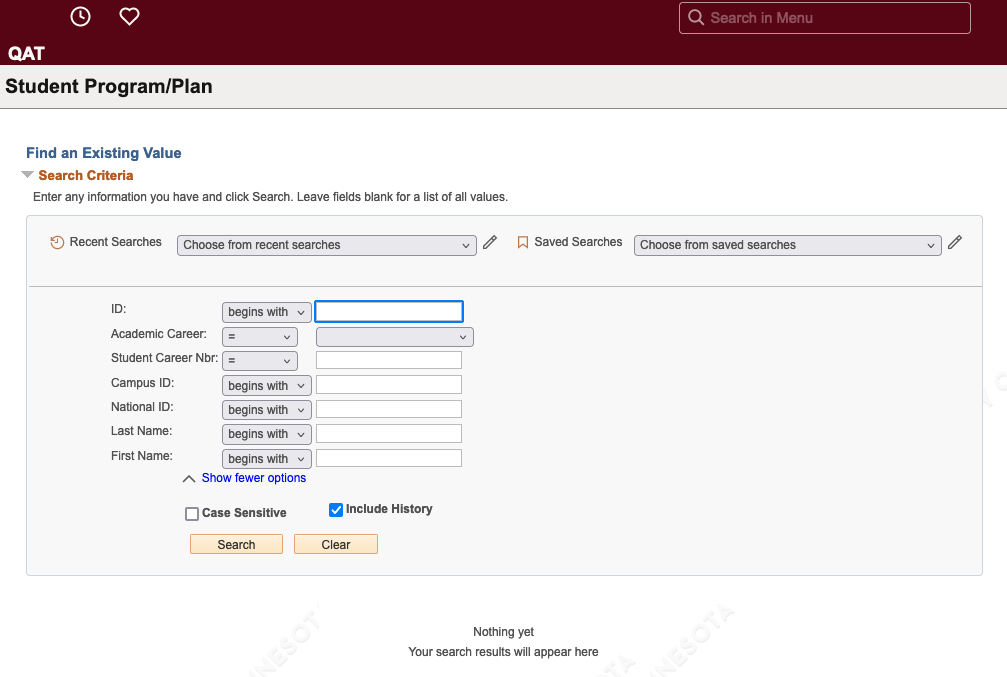
PeopleSoft Campus Solutions users will notice changes that include a new look and additional options on all search pages. 

The new Student Program Plan search page. The new layout includes more search options and a gray box outlining the search fields.

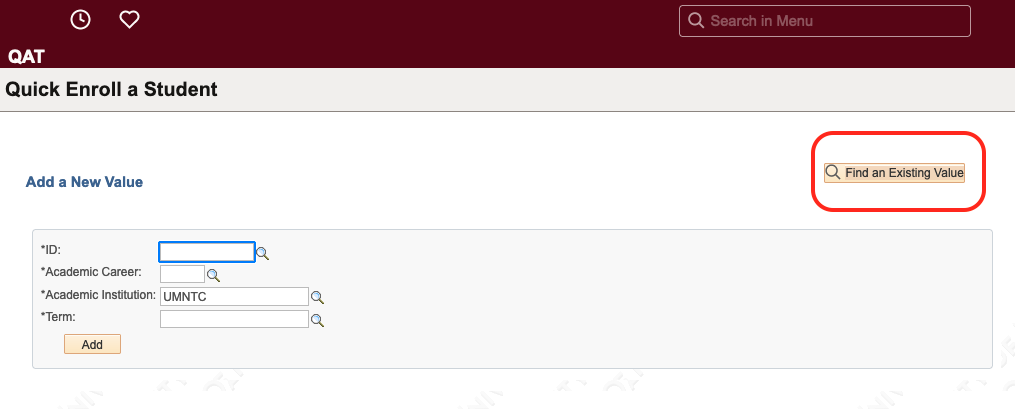
Additionally, a button has replaced the tab layout on search pages that include the option to Add a New Value or Find an Existing Value. This includes the Quick Enroll a Student, Student Program Plan, Request a Transcript Report, and other pages.

The Quick Enroll a Student search page. On the right, a yellow button titled "Find an Existing Value" is circled in red.

Tuesday, May 2, 2023

System Support guides

On the ASR website, under training and support, you’ll find the following system support resources: 


  • The Faculty Center, Advisor Center, and Student Services Center collapsible folder has guides that are geared toward instructors (and proxies) to help with various class set-up questions, such as How to Enter a Final Grade.

  • The PeopleSoft CS- Class Scheduling and Student Records collapsible folder has guides available to help with common business processes in PeopleSoft. You’ll find helpful guides on Program/Plan setup, Service Indicators, CCS (including Combined Sections), and more.

Wednesday, May 11, 2022

System support guides

On the ASR website, under training and support, you’ll find system support resources.

The Faculty Center, Advisor Center, and Student Services Center collapsible folder has guides that are geared towards instructors (and proxies) to help with various class set-up questions, such as How to Enter Final Grades.

The PeopleSoft CS- Class Scheduling and Student Records collapsible folder has a variety of guides available to help with various common business processes in PeopleSoft. You’ll find helpful guides on Program/Plan setup, Service Indicators, CCS (including Combined Sections), and more.

Wednesday, August 11, 2021

PeopleSoft Campus Solutions user guides

A list of PeopleSoft Campus Solutions user guides can be found on the Academic Support Resources (ASR) website. These guides are often step by step guides to help with common business processes. If you need help remembering the path to a Campus Solution’s page, the Campus Solutions Navigation Guide is also available.

Wednesday, July 14, 2021

PeopleSoft Campus Solutions user guides

As a reminder, detailed PeopleSoft Campus Solutions guides can be found on the Academic Support Resources (ASR) website. If you need help remembering the path to a Campus Solution’s page, the Campus Solutions Navigation Guide is also available.

Thursday, May 13, 2021

UM Waitlist Email History page in Peoplesoft

The UM Waitlist Email History page in PeopleSoft allows you to see the system generated messages students are emailed (per term) each time the system tries to auto-enroll the student from a wait list into a class. This page can be helpful when troubleshooting why a student has not been auto-enrolled into the class from the wait list.

You can find this page by going to Records and Enrollment >Term Processing Waitlists> UM Waitlist Email History.