Go to the U of M home page

Pages

Wednesday, August 19, 2015

Summer classroom renovations, additions and updates

Several general purpose classrooms received environment or technology updates during the summer, including the following: Major renovations:

  • Ruttan B25, Blegen 317, and Mayo C231 received new furniture, finishes, and lighting updates. Blegen 245 and 255 were combined to create a larger room.
  • Technology feature upgrades were completed in more than 60 rooms.
  • Improvements include: wide-screen video projectors, HDMI input cables, and class capture output connections.
  • New learning spaces added: thirteen Mondale Hall classrooms were added to the inventory and updated with newer video projectors. Mayo C231 was added to the inventory and renovated as noted above. Blegen 317, Appleby 204, and Ford B53 were converted to classrooms and received finish updates.

Resource for classroom searches

The Office of Classroom Management (OCM) has a resource to search for classrooms. The General Purpose Classroom Search allows you to find classrooms that meet your specifications. You can filter by campus, building, capacity, and/or feature. You can also view room details, including capacities, layout, photo, links to campus maps, and room schedule.

Wednesday, August 5, 2015

Confirm your room assignments for fall semester

All room assignments for fall 2015 (1159) have been made. Review assignments for your department on the Class Search to ensure all classes requiring a general purpose classroom have been assigned. Contact Scheduling with any questions about general purpose classroom assignments.
Reminders:
  • The Office of Classroom Management (OCM) only finds a general purpose classrooms for classes with a blank Facility ID in CCS. If the Facility ID field is populated (including a virtual space such as ROOM000TBA), OCM is not actively looking for a classroom for your class.
  • Please encourage instructors to verify their classroom assignment before the first class. While it usually only affects a small number of classes, room assignments are subject to change prior to the start of term.
  • Changes to room assignments do not generate automated emails. If you change a room assignment, you must notify instructors and students directly.
  • Room assignments are subject to change prior to the start of the term. While this usually only affects a small number of classes, the Office of Classroom Management (OCM) encourages instructors to verify their classroom assignment before the first class meeting.

Cancelling classes for fall 2015

There are a large number of classes on the fall 2015 (1159) class schedule with a room assignment but no enrolled students. If you do not plan to offer a class, cancel the class in CCS as soon as possible. Simply changing the enrollment capacity to zero and checking the "no print" box in CCS will not release the classroom assignment. The class must be cancelled directly in CCS.

For classes with low enrollment that you plan to cancel, email ocmsched@umn.edu to process your cancellation. If your college requires collegiate approval for cancellation with low enrollment, refer to your college procedures. Remember to always notify enrolled students directly prior to requesting a class cancellation.

Changes to Scheduling Completely Online Classes

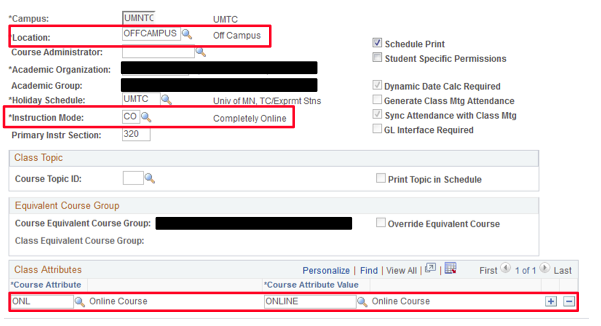
Students and others using the Class Search may wish to search for only those classes offered in a completely online format. The manner in which class schedulers set up completely online classes, so that they are searchable on this criterion, has changed slightly.

Beginning no later than the Spring 2016 schedule, CCS schedulers should enter the following information on UM CCS Maintain Schedule of Classes Basic Data tab when scheduling a completely online class:

  • Location: OFFCAMPUS
  • Instruction Mode: CO (Completely Online)
  • Course Attribute: ONL (Online)

Those using the Class Search will then be able to search for completely online class offerings by selecting “Online Class” as the Course Attribute, or “Completely Online” as the Mode of Instruction.

Room assignment changes are possible if changing a meeting pattern or enrollment capacity

If making changes to a class meeting pattern or enrollment capacity after a classroom has already been assigned, schedulers will notice that the classroom assignment does not immediately drop from the meeting pattern’s Facility ID display. Rather, OCM monitors changes to meeting patterns and enrollment capacities to make sure that classrooms do not double book or exceed the maximum capacity following a change. Classes needing a General Purpose Classroom reassignment will receive one. Schedulers can be proactive by checking the room calendars and capacities in Astra Schedule prior to making these changes in CCS.

Entering instructors on multiple meeting pattern classes in CCS

CCS schedulers should take care when entering instructors for multiple meeting pattern classes. Incomplete entry of instructors can result in some pitfalls to grade roster access and the students' academic schedules on MyU.

When scheduling classes with multiple meeting patterns, make sure to have an instructor with Grade Approve access entered onto each of the meeting patterns. This ensures that instructors with grading responsibilities have access to their grade rosters when it comes time to enter the grades.

When using an Instructor Role of Primary Instructor in CCS, be sure to enter a Primary Instructor for each meeting pattern of multiple meeting patterns classes. Doing so ensures that all meeting patterns are correctly displayed for the enrolled students on their academic schedules in MyU.