Go to the U of M home page

Pages

Wednesday, August 5, 2015

Changes to Scheduling Completely Online Classes

Students and others using the Class Search may wish to search for only those classes offered in a completely online format. The manner in which class schedulers set up completely online classes, so that they are searchable on this criterion, has changed slightly.

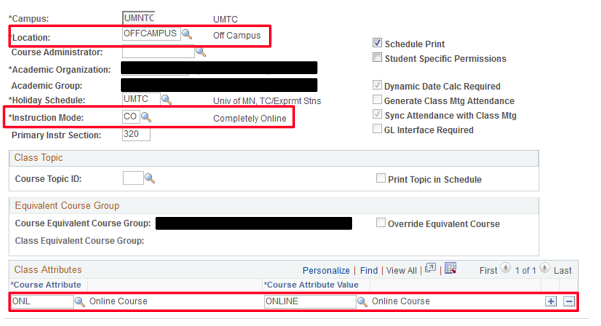
Beginning no later than the Spring 2016 schedule, CCS schedulers should enter the following information on UM CCS Maintain Schedule of Classes Basic Data tab when scheduling a completely online class:

  • Location: OFFCAMPUS
  • Instruction Mode: CO (Completely Online)
  • Course Attribute: ONL (Online)

Those using the Class Search will then be able to search for completely online class offerings by selecting “Online Class” as the Course Attribute, or “Completely Online” as the Mode of Instruction.

Room assignment changes are possible if changing a meeting pattern or enrollment capacity

If making changes to a class meeting pattern or enrollment capacity after a classroom has already been assigned, schedulers will notice that the classroom assignment does not immediately drop from the meeting pattern’s Facility ID display. Rather, OCM monitors changes to meeting patterns and enrollment capacities to make sure that classrooms do not double book or exceed the maximum capacity following a change. Classes needing a General Purpose Classroom reassignment will receive one. Schedulers can be proactive by checking the room calendars and capacities in Astra Schedule prior to making these changes in CCS.

Entering instructors on multiple meeting pattern classes in CCS

CCS schedulers should take care when entering instructors for multiple meeting pattern classes. Incomplete entry of instructors can result in some pitfalls to grade roster access and the students' academic schedules on MyU.

When scheduling classes with multiple meeting patterns, make sure to have an instructor with Grade Approve access entered onto each of the meeting patterns. This ensures that instructors with grading responsibilities have access to their grade rosters when it comes time to enter the grades.

When using an Instructor Role of Primary Instructor in CCS, be sure to enter a Primary Instructor for each meeting pattern of multiple meeting patterns classes. Doing so ensures that all meeting patterns are correctly displayed for the enrolled students on their academic schedules in MyU.

Class Search for spring 2016

To facilitate the registration for our newest undergrads, Class Search is modified for spring 2016 (1163) to display only undergraduate classes that are open for freshmen full year registration (FRFY).

If your classes do not have the class attribute FRFY, they will not show up in the Class Search until summer orientation is completed and fall term begins, September 8, 2015. However, you can still find them in the Class Schedule Summary Report in the Reporting Center, or in Course Enrollment Status in Student Center.

You may notice classes without the attribute FRFY have Stop Further Enrollment status on the Enrollment Control page. An ASR nightly process puts Stop Further Enrollment status on all non-FRFY classes. Once fall term begins, ASR will return these classes back to Active status, and they will again be listed on the Class Search.

Reminder: Check WiFi access in departmental classrooms

Are you scheduling classes in departmental conference rooms or classrooms? The UMN Office of Information Technology wants to ensure that all academic spaces have adequate WiFi coverage in time for the fall semester.

To help do that, it's important for faculty and staff members to take a few minutes to check the classroom's access to the "UofM Secure" WiFi network. If you identify any classrooms with inadequate coverage, please contact OIT Technology Help at 612-301-4357 or mark the location using UMN IT's online WiFi feedback tool: WiFi.umn.edu.

Monday, July 13, 2015

Astra Schedule upgrade completed

Astra Schedule system upgrade is now complete. Please note: Users should clear their browser history before logging into Astra Schedule.

Highlights of the upgrade include:

  • a significant increase in the speed and functionality of the scheduling grid calendar views
  • direct links to the scheduling calendars from the Astra homepage
  • customization options for the scheduling grid calendars
  • more streamlined event request forms


If you have questions about the upgrade or experience errors, please email ocmsoftwarehelp@umn.edu.

Thursday, July 9, 2015

Astra Schedule software upgrade

Astra Schedule will undergo a planned system upgrade on Friday, July 10. Access to Astra Schedule will be completely unavailable during the upgrade.

The system will be unavailable from Thursday, July 9 at 10:00 p.m. through start of business on Monday, July 13. This upgrade does not affect PeopleSoft or CCS. Updates on the outage will be available on the University's IT Service Status page.

After this upgrade, users will notice a significant difference in the speed and functionality of the scheduling calendars views.

If you have questions about Astra Schedule, please contact OCMSoftwareHelp@umn.edu.